
Your whole operation, on one screen.
Most PC problems get fixed without leaving your chair.
22online
Real console screens: Dashboard, Wall, Machines, Alerts, Fleet activity, Remote, Terminal, Security, Timeline, Actions, Reports, Messages.
Built for real fleets
Argos in your business
Pick your type of business and see what each feature does for your operation, on the real console.
- 30-day screenshot history by default
- Console in 4 languages
- For Windows PCs
What any business with Windows PCs gains
You see how work is going, fix problems remotely, and catch what matters in time.
Demo environment · Fictional data
You know who's working right now
Live presence and a timeline of each machine's day, without walking the office or asking.
Feature: Real-time presenceYou fix a PC from your desk
You take over the machine's mouse and keyboard as if you were sitting in front of it.
Feature: Real remote controlYou find out when something fails
An offline PC or a disabled antivirus reaches you by Telegram or email.
Feature: Notification channelsEveryone sees their own time
Each person sees their active time for the day and marks their breaks with a button. You and your team look at the same numbers.
Feature: My time
Call centers and phone sales
Supervise the whole floor without walking it, and count calls as work.
Demo environment · Fictional data
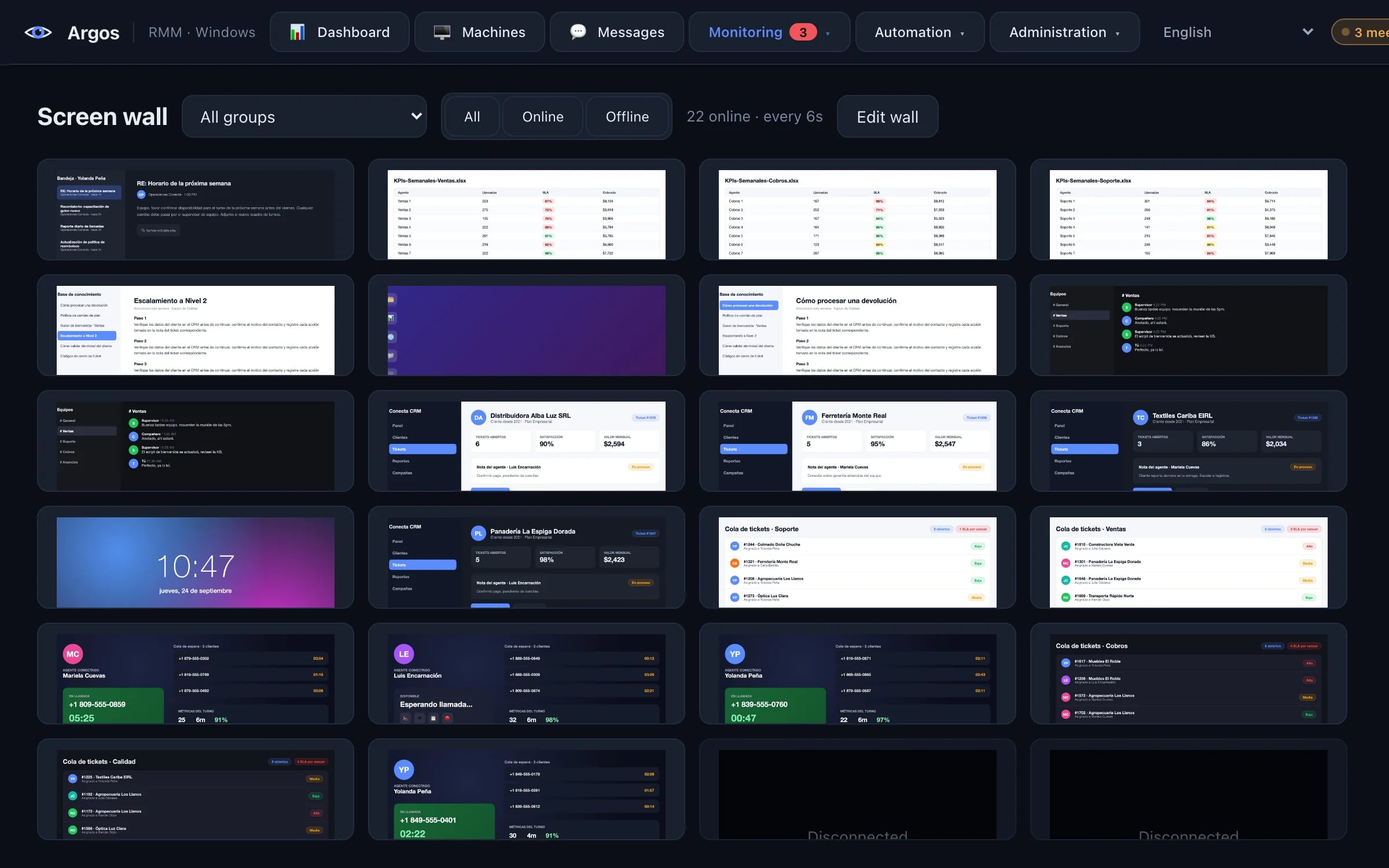
The whole floor on one screen
The wall shows the screen of every seat that's online, with its user and status.
Feature: Screen wallA call counts as work
If the softphone is using the microphone, the seat doesn't show as idle even if the mouse doesn't move. No audio is recorded.
Feature: On a callEvery break, marked by the person taking it
The person marks their break in My time and you see it separate from idle time.
Feature: My timeAn alert when someone passes your threshold
You decide how many idle minutes is too many, and the alert goes to the supervisor.
Feature: Alert rules
Collections and back office
Measure performance with data and remove distractions from the workday.
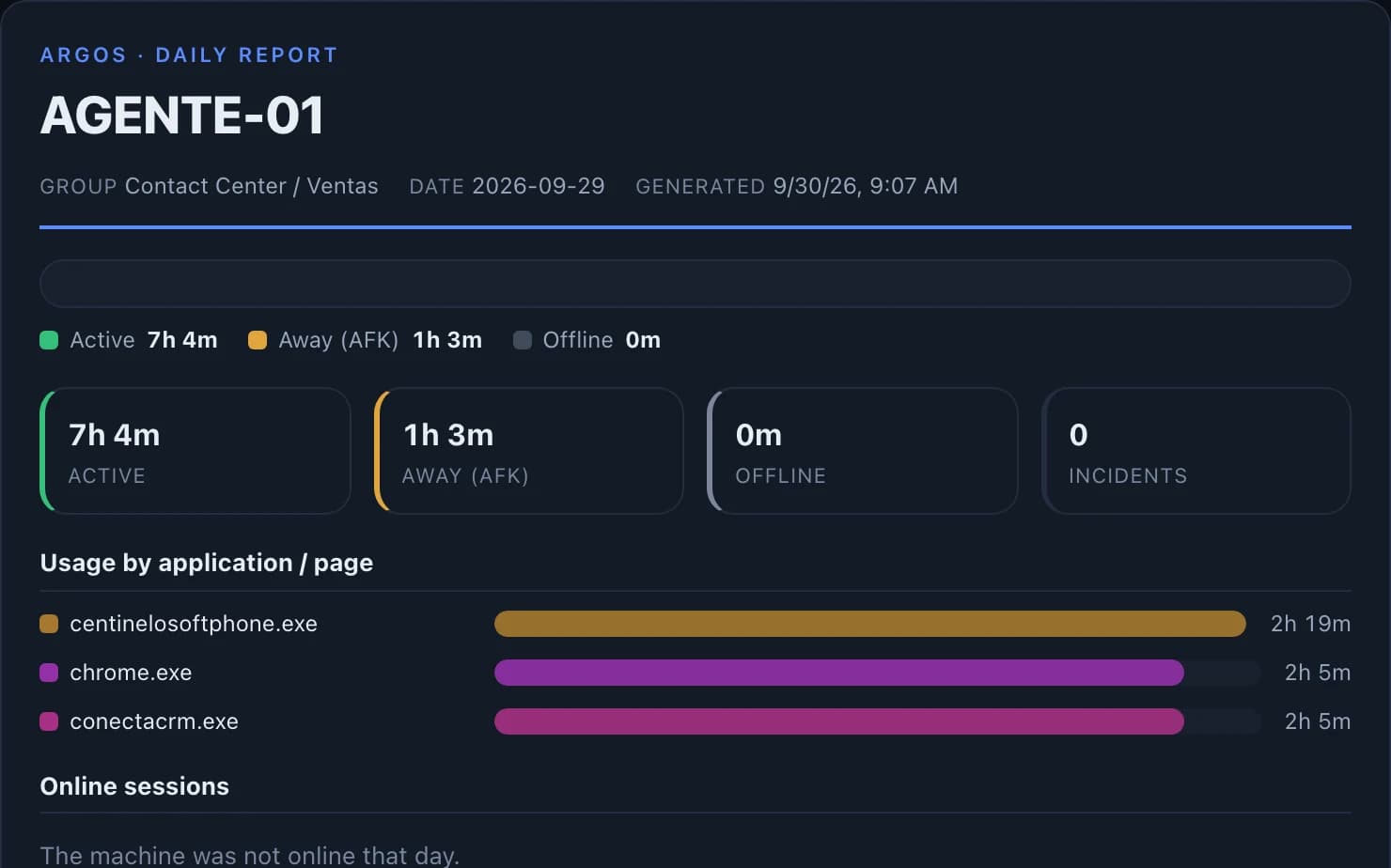
Demo environment · Fictional data
Real hours in the CRM, per collector
Time in every app and website for each seat, summarized by day.
Feature: Per-app and per-page usageFewer distractions during the workday
You block social media and sites that aren't work-related.
Feature: Block websites by domainEvidence when you need it
Screenshots when someone opens the apps you care about, kept for 30 days by default.
Feature: Activity-triggered capturesPCs rest outside work hours
Outside the hours you set, the screen locks on its own and open work is preserved.
Feature: Work-hours lock
Offices and professional services
Remote tech support even if you don't have an IT team.
Demo environment · Fictional data
Support without visits
Remote terminal and file transfer to fix things without going to the desk.
Feature: Remote terminalMaintenance runs on its own
You schedule scripts on one machine or the whole fleet, at set intervals or a fixed time.
Feature: Scheduled scriptsPCs rest outside work hours
Outside the hours you set, the screen locks on its own and open work is preserved.
Feature: Work-hours lockUSB drives under control
You decide which USB devices can connect to each machine.
Feature: USB blocking and allow list
Clinics and medical offices
Protected machines and logged access, at the front desk and in the exam rooms.
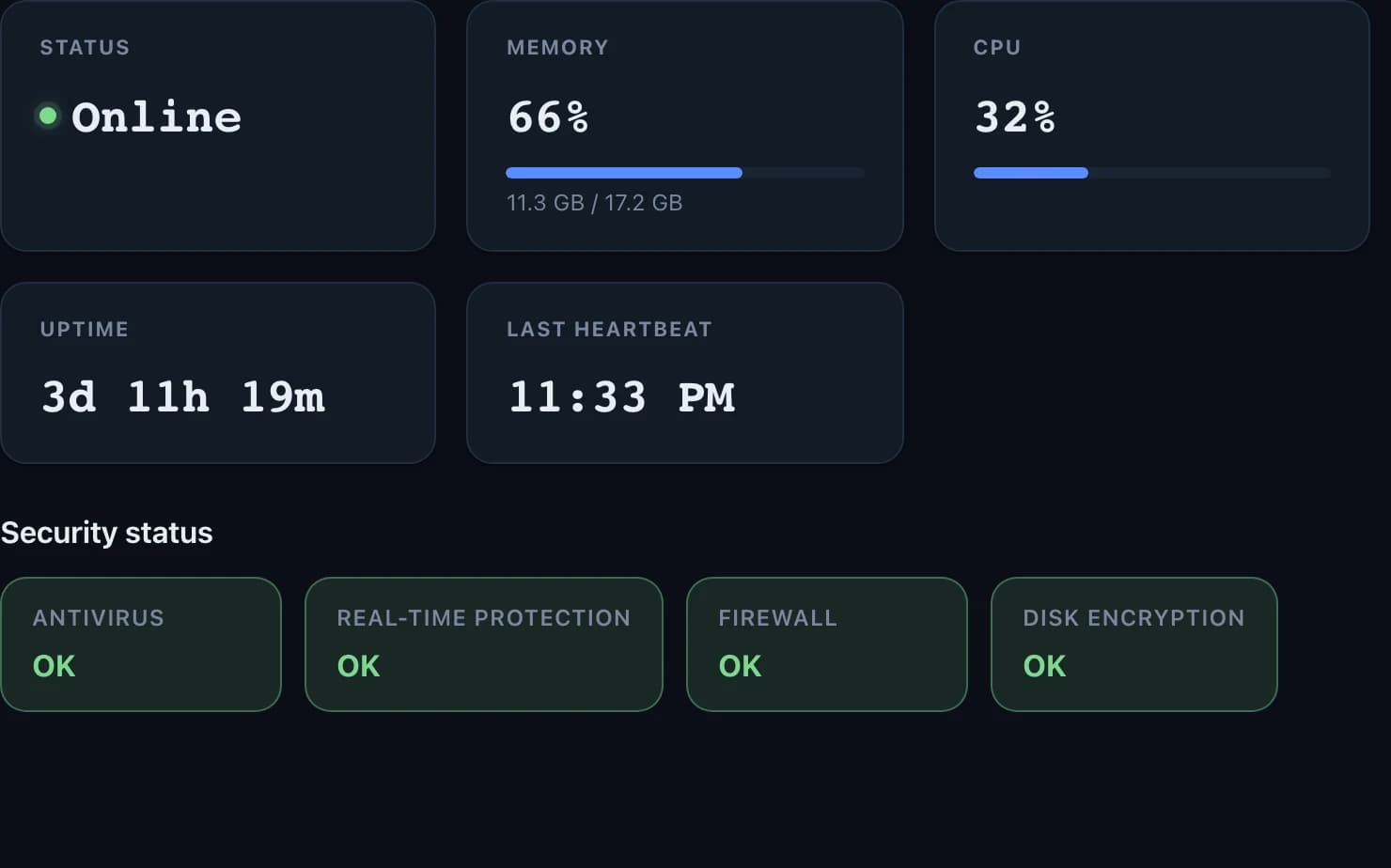
Demo environment · Fictional data
Every PC's protection, at a glance
Antivirus, firewall, and disk encryption for each machine, with an alert if one is turned off.
Feature: Alert rulesSensitive apps aren't captured
You choose the apps Argos never captures, like the clinical system. If it can't tell which window is in front, it doesn't capture.
Feature: Capture exclusions and minimal capturesEvery access is logged
Two-factor sign-in for the console and a record of who opened which screen and when.
Feature: Audit logEach employee acknowledges the notice
You keep every version of the monitoring notice and each person's confirmation, ready to export.
Feature: Monitoring notice with acknowledgment
Argos helps protect your clinic's machines, but it doesn't certify or replace compliance with the health regulations that apply to you. For clinics, we coordinate the setup with you.
How much time do you get back?
A few minutes a day per person add up to hours each month. Adjust the values and see it with your numbers.
Example values for any business.
Estimated time recovered
Estimate66.7hours per month
800hours per year
That's 8.3 8-hour workdays every month. Each block is one workday.
What those hours cost
Add an hourly cost to see what those hours are worth.
20 seats × 10 min × 20 days ÷ 60 = 66.7 h per month
People who work on a PC with Argos.
For example, less dead time between tasks or a problem fixed remotely.
The days your team works in a normal month.
The average hourly cost of an employee. Only used to show what those hours are worth.
This is an example to size things up, not a promise or a measured result. The time you get back depends on your operation, and with Argos you measure it with real data from your own seats.
Interactive demo
This is what your operation looks like in Argos.
Screenshots of the real console: dashboard, screen wall, alerts and remote control.
Demo data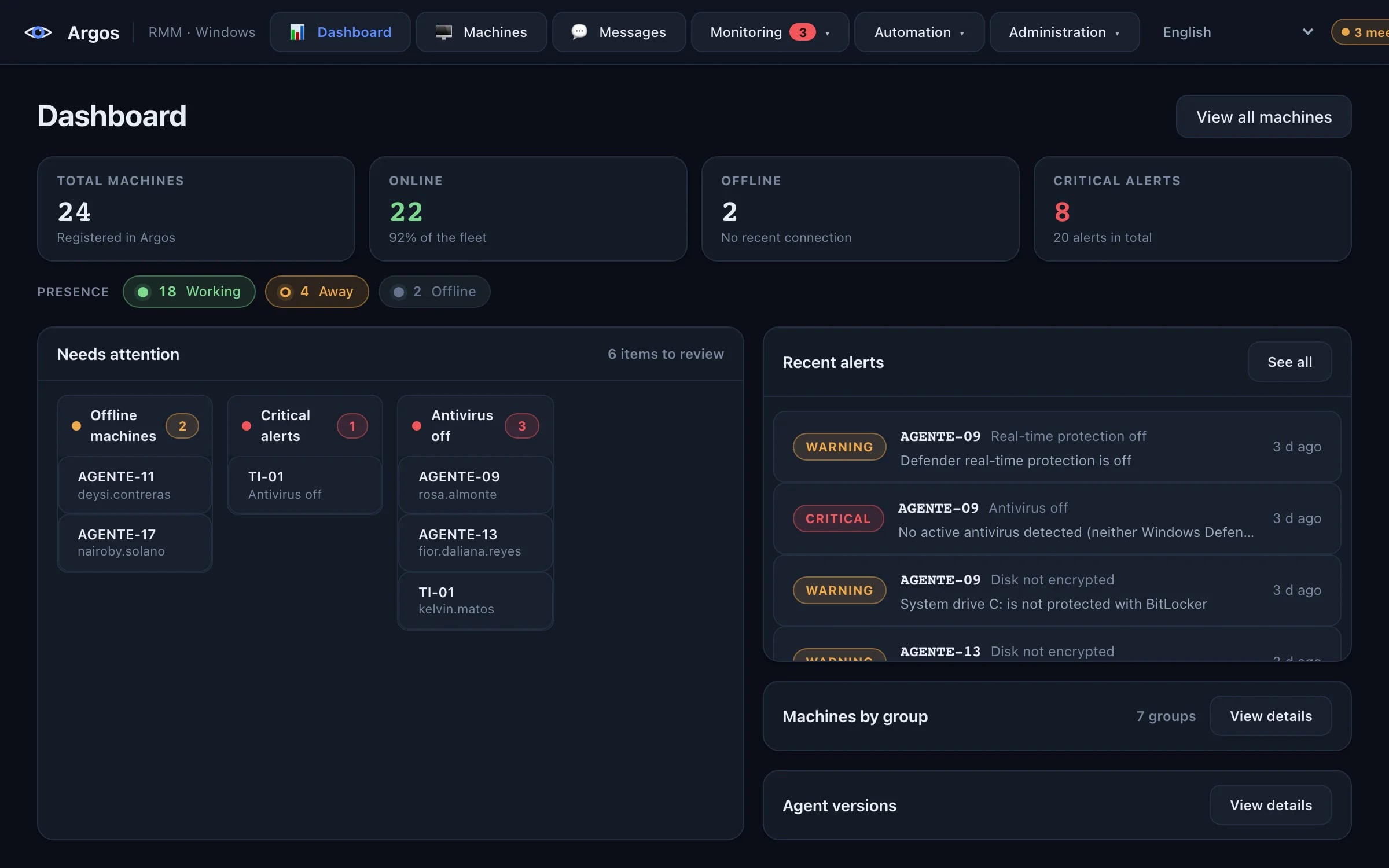
The whole fleet in one view: how many machines are online, who is working, what needs attention and the latest alerts.
Demo environment · Fictional data
Everything you need to operate
One console, six control areas
From visibility to remote control, through automation and security: all on the same panel.
Monitoring & visibility
Real-time fleet dashboard, screen wall, 24h activity timeline, presence, and historical CPU/RAM/disk metrics.
- Real-time fleet dashboard
- Live screen wall
- 24h activity timeline per machine
Remote user support
Take real control of any machine, with granular consent, remote terminal and file transfer.
- Real remote control (mouse + keyboard)
- Live screen view
- Granular user consent
Remote machine administration
Problems fixed without leaving your chair: real remote control, restarted services, installed patches.
- Restart, shut down, lock or log off
- Kill processes and control services
- USB blocking and allow list
Automation
Scheduled scripts, automation rules and agent updates without manual intervention.
- Scheduled scripts per machine or interval
- Reusable script library
- Automation rules
Alerts & notifications
Configurable rules with multiple channels and no alert storms on restart.
- Rules for inactivity, CPU, RAM, disk and security
- Channels: webhook, Telegram and email
- Persistent alert deduplication
Security & governance
Granular access control, two-factor authentication and full audit of every sensitive action.
- Multiple operators with roles and permissions
- Per-operator machine scope
- Two-factor authentication (TOTP)
Find out before they call you.
Every PC tells you when it goes offline, when its protection is turned off, or when someone passes the idle threshold you set. The alert reaches you by Telegram, email, or your own system.
- PC offline
- Antivirus off
- Idle above your threshold
- Disk almost full
150+ data points per machine
Argos sees what your fleet actually does
Identity, live resources, inventory, software, services, security, activity and connectivity: all captured automatically.
Explore the data catalog →+ 138 more fields per machine
Put your fleet under one console
Install it today and see your machines online in minutes.